Note
Access to this page requires authorization. You can try signing in or changing directories.
Access to this page requires authorization. You can try changing directories.
Important
The deprecation of the MedTech service was initiated 3 May 2025. If using a MedTech service is no longer a priority, deprovision your instance, which can be found here. Support for active instances in the following regions will end 3 May 2028: West US2, UK South, West Europe, East US, Australia East, East US 2, Central India, North Europe. The Open Source version of the MedTech service can be found here.
In this article, learn about using the MedTech service and Microsoft Teams for notifications.
The MedTech service and Teams notifications reference architecture
When combining the MedTech service, the FHIR® service, and Teams, you can enable multiple care solutions.
The diagram is a MedTech service to Teams notifications conceptual architecture for enabling the MedTech service, the FHIR service, and the Teams Patient App.
You can even embed Power BI Dashboards inside the Microsoft Teams client. For more information on embedding Power BI in Microsoft Team, see Embed Power BI content in Microsoft Teams.

The MedTech service for can ingest IoT data from most IoT devices or gateways regardless of location, data center, or cloud.
We do encourage the use of Azure IoT services to assist with device/gateway connectivity.
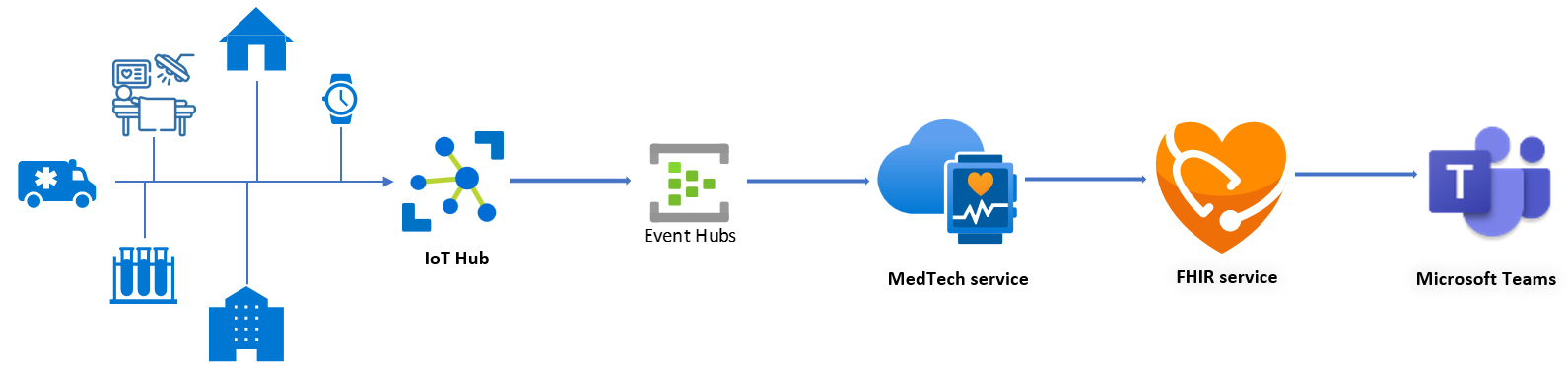
For some solutions, Azure IoT Central can be used in place of Azure IoT Hub.
Azure IoT Edge can be used in with IoT Hub to create an on-premises end point for devices and/or in-device connectivity.

Next steps
Understand the MedTech service device data processing stages
Choose a deployment method for the MedTech service
Note
FHIR® is a registered trademark of HL7 and is used with the permission of HL7.