Hi,
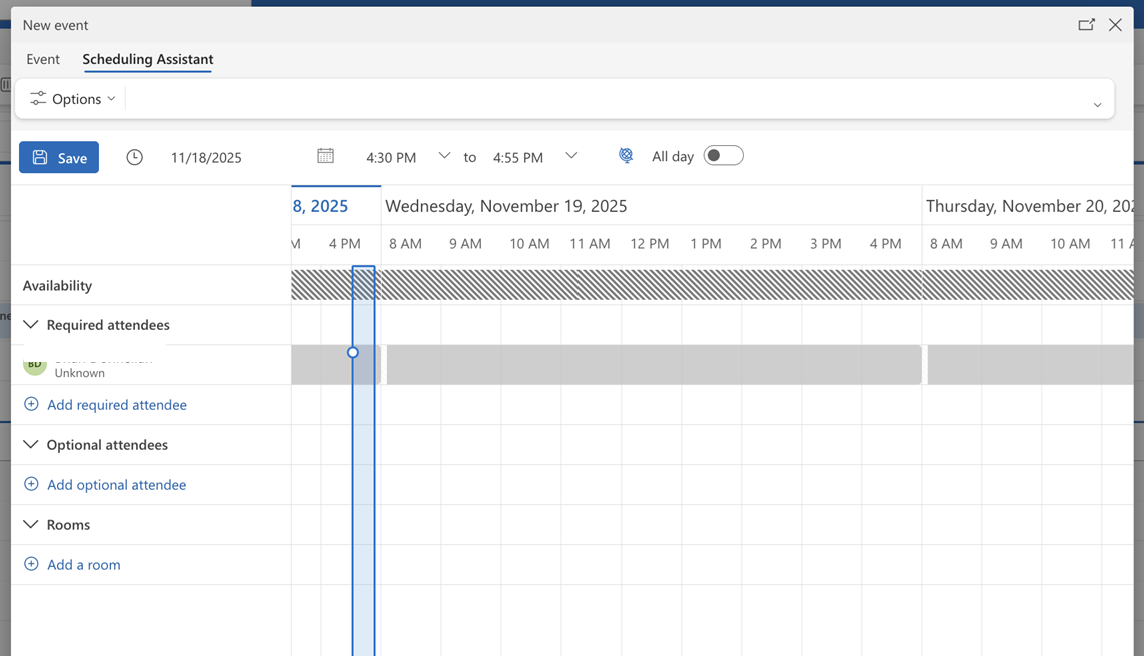
My calendar on MS Outlook appears blocked. Colleagues can't schedule meetings with me. However, I haven't placed any blocks on my calendar. I have an image of how it appears in Scheduling Assistant. I do have two Outlook calendars for 2 different employers - I'm wondering if this is causing the issue. I've tried all afternoon to troubleshoot this through gpt to no success. As you will notice from the image there is a grey block appearing across my calendar indefinitely. How do I remove that block?
Below are my notes from gpt of everything I tried this afternoon to no avail. Thank you for the help!!
Identity & Account Steps
Verified that my home Microsoft 365 organization is my primary employer, not the secondary organization.
Attempted to switch organizational context inside Outlook and Microsoft Account pages.
Used the Microsoft "Pick an account" screen and chose “Forget” on old/duplicate accounts.
Fully signed out of Microsoft 365 accounts and re-authenticated.
Confirmed I have guest access to the secondary organization but primary identity belongs to another tenant.
Browser & Cache Steps
Cleared browser cache and cookies completely.
Tried using multiple browsers (Chrome, Safari).
Verified that third-party cookies are enabled.
Restarted browser after clearing cache.
Outlook Web App (OWA) Calendar Configuration
Confirmed correct time zone (Eastern Time) in Calendar → View settings.
Verified that “Add a global calendar” is disabled.
Checked “Shared calendars” settings — only default “Can view when I’m busy” is enabled.
Reset shared calendar publishing links.
Verified “Accounts” under Calendar settings — no personal accounts linked.
Checked “Work hours and location” for any anomalies.
Ensured the correct calendar is selected under “My calendars.”
Scheduling Assistant Behavior
Created multiple test events using the Scheduling Assistant.
Confirmed that my own availability appears as “Unknown” for all future times.
Verified that this issue persists regardless of browser or cache resets.
Verified that other calendars appear correctly — only my own free/busy is impacted.
Identity Isolation
Logged out across all Microsoft services using: https://login.microsoftonline.com/logout.srf
Re-logged into Outlook via both:
My primary employer’s account
My secondary organization’s account
Observed that when logged into the secondary tenant, my primary calendar shows Unknown availability.
- Recognized this may be caused by cross-tenant free/busy visibility issues.
Identity & Account Steps
- Verified that my home Microsoft 365 organization is my primary employer, not the secondary organization.
- Attempted to switch organizational context inside Outlook and Microsoft Account pages.
- Used the Microsoft "Pick an account" screen and chose “Forget” on old/duplicate accounts.
- Fully signed out of Microsoft 365 accounts and re-authenticated.
- Confirmed I have guest access to the secondary organization but primary identity belongs to another tenant.
Browser & Cache Steps
- Cleared browser cache and cookies completely.
- Tried using multiple browsers (Chrome, Safari).
- Verified that third-party cookies are enabled.
- Restarted browser after clearing cache.
Outlook Web App (OWA) Calendar Configuration
- Confirmed correct time zone (Eastern Time) in Calendar → View settings.
- Verified that “Add a global calendar” is disabled.
- Checked “Shared calendars” settings — only default “Can view when I’m busy” is enabled.
- Reset shared calendar publishing links.
- Verified “Accounts” under Calendar settings — no personal accounts linked.
- Checked “Work hours and location” for any anomalies.
- Ensured the correct calendar is selected under “My calendars.”
Scheduling Assistant Behavior
- Created multiple test events using the Scheduling Assistant.
- Confirmed that my own availability appears as “Unknown” for all future times.
- Verified that this issue persists regardless of browser or cache resets.
- Verified that other calendars appear correctly — only my own free/busy is impacted.
Identity Isolation
- Logged out across all Microsoft services using:
https://login.microsoftonline.com/logout.srf
- Re-logged into Outlook via both:
- My primary employer’s account
- My secondary organization’s account
- Observed that when logged into the secondary tenant, my primary calendar shows Unknown availability.
- Recognized this may be caused by cross-tenant free/busy visibility issues.
' cx='32' cy='32' r='32' /%3E%3Ctext x='50%25' y='55%25' dominant-baseline='middle' text-anchor='middle' fill='%23FFF' %3EBD%3C/text%3E%3C/svg%3E)


' cx='32' cy='32' r='32' /%3E%3Ctext x='50%25' y='55%25' dominant-baseline='middle' text-anchor='middle' fill='%23FFF' %3ESN%3C/text%3E%3C/svg%3E)